 how-to
How to Verify Creator Payments: A 2026 Guide
Table of Contents
- What Does Verifying Creator Payments Actually Mean?
- Step 1: Complete Your Identity Verification
- Step 2: Set Up Your Payout Method and Banking Details
- Step 3: Submit Your Tax Documentation (W-9 vs. W-8BEN)
- Step 4: Track Payment Status in Your Creator Dashboard
- Step 5: Use Creator Payout Tracking Tools for Multiple Platforms
- Troubleshooting Missing Creator Payments
- Security Best Practices for Your Payout Accounts
- Conclusion: Get Paid Without the Runaround
- Frequently Asked Questions
Last Updated: September 6, 2026
What Does Verifying Creator Payments Actually Mean?
Verifying creator payments is the process of confirming your identity, linking a payout method, and submitting tax documentation so a platform can legally send you the money you've earned. It is the gateway between "I made content" and "I got paid," and it applies whether you're earning from subscriptions, tips, or revenue sharing. Most creators assume this is a single step, but it's actually a chain of checks that platforms run to meet regulatory requirements and protect against fraud.
At hush, we route 70% of subscription revenue directly to the writers and voice actors on our platform, which means we handle payment verification constantly.
A common misconception is that verification only matters when you first sign up. In practice, platforms re-verify accounts when you change payout methods, hit certain earning thresholds, or update your legal name. Getting this right from day one saves you from the single most frustrating experience a creator can have: watching your dashboard show earnings while your payout stays stuck in "pending" status.
Below, we'll walk through the five steps that cover nearly every platform, from self-onboarding to payment status tracking. We'll also cover what to do when things go wrong, because verification failures are far more common than most guides admit.
Step 1: Complete Your Identity Verification
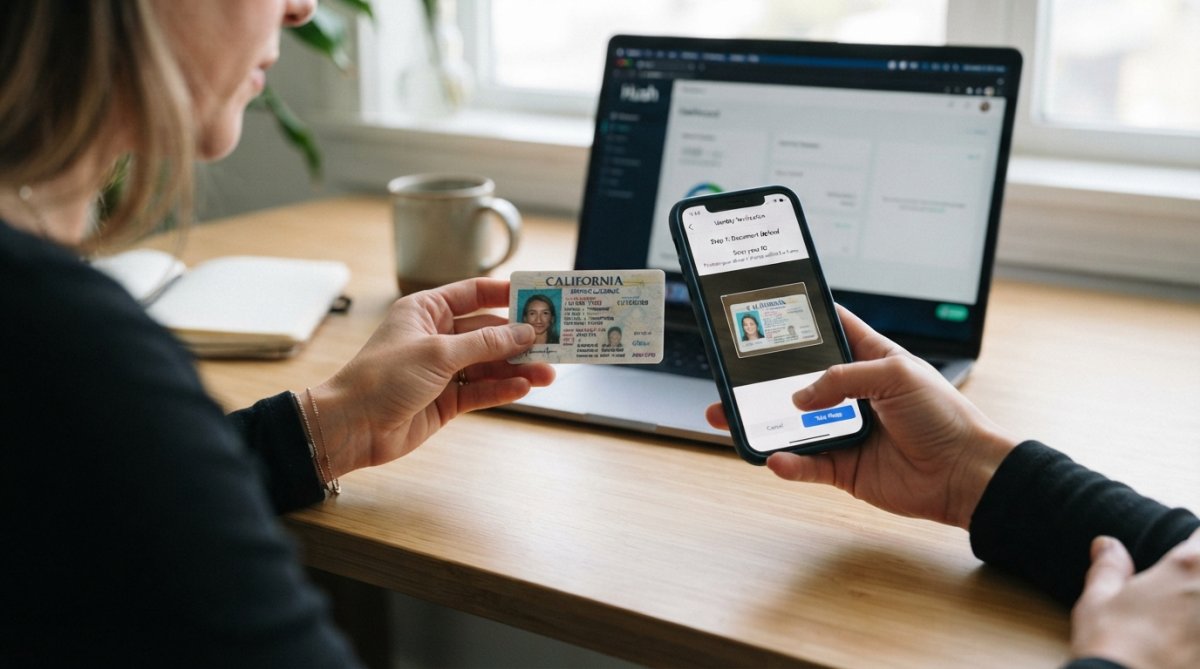
Identity verification is the foundation of the entire payout process. Platforms are legally required to know who they're paying, a practice governed by KYC (Know Your Customer) standards that apply across the financial and payments industry.
The verification process works like this: you enter your legal name, date of birth, and address, then upload a government-issued ID. The platform cross-checks your details against the ID document and sometimes runs a quick database check to confirm you are who you say you are. Verification approval usually takes anywhere from a few minutes to 48 hours, depending on the platform and whether your documents are clear.
Documents You Will Need
Before you start, gather these items so you don't stall mid-process:
- A government-issued photo ID (driver's license, passport, or state ID)
- Your legal name exactly as it appears on that ID
- Your current residential address
- A phone number capable of receiving SMS verification codes
Identity verification is not a one-time event. Expect to re-verify if you change your legal name, move to a new country, or update your payout method after a long gap.
Step 2: Set Up Your Payout Method and Banking Details
Once your identity clears, you'll connect a destination for your funds. The most common payout methods are direct bank transfer, digital wallets, and platform-specific payout dashboards. Bank transfers are the most widely supported and generally have the lowest fees, but they take one to three business days to arrive.
When entering banking details, accuracy is everything. A single transposed digit in your routing or account number can send your payment into limbo. Double-check the account holder name: it must match your verified legal name, not your business brand or pen name.
Some platforms let you split payouts across multiple methods or schedule automatic transfers once you cross a minimum balance threshold. If you're earning across several platforms, consider using a dedicated business bank account to keep payment reconciliation simple at tax time.
Step 3: Submit Your Tax Documentation (W-9 vs. W-8BEN)
Tax compliance is the step creators skip, and it's the one that causes the longest delays. The confusion isn't just about which form to pick, it's about understanding how that choice changes what you get paid today and what paperwork you'll face in January.
The Decision Tree: Which Form Applies to You
Start with your citizenship and residency status, not where the platform is headquartered. The rules follow your tax status, not the platform's location.
- U.S. citizen or U.S. resident alien for tax purposes: You file a W-9. This provides your Social Security Number (SSN) or Employer Identification Number (EIN) and certifies you're subject to U.S. tax reporting. No withholding is taken from your payouts; you're responsible for estimated quarterly taxes if your net earnings exceed $400.
- Nonresident alien (no green card, not passing the substantial presence test): You file a W-8BEN. This certifies your foreign status. The platform will typically withhold 30% of your U.S.-source income unless a tax treaty between your country of residence and the United States reduces that rate. The W-8BEN is where you claim that treaty benefit, you must know the specific treaty article and rate, not just check a box.
- Foreign entity (LLC, corporation, or partnership outside the U.S.): You file a W-8BEN-E, not a W-8BEN. This form is longer and asks about your entity type and any intermediate owners. Many creators mistakenly file a personal W-8BEN for their foreign business entity, which can trigger a rejection or incorrect withholding.
The 1099 Question: What Happens at Year-End
The form you file determines what you receive in January. If you filed a W-9, the platform issues you a 1099-NEC (Nonemployee Compensation) if your payouts exceeded $600 in the calendar year. That form reports your gross earnings to the IRS, and you'll reconcile it against your Schedule C when filing.
If you filed a W-8BEN, the platform generally does not issue a 1099. Instead, you may receive a 1042-S form, which reports the gross amount paid and any tax withheld. The 1042-S is less familiar to most creators, and it's easy to overlook during tax season, but you need it to claim a refund of excess withholding if your treaty rate was misapplied.
Withholding Mechanics: What Actually Hits Your Payout
If you're a nonresident alien without a treaty claim, expect 30% of each payout to be withheld and remitted to the IRS. With a valid treaty claim, that rate may drop to 15%, 10%, or even 0% depending on your country and the type of income (royalties vs. independent contractor services). The platform's payout dashboard usually shows the withholding line item before you confirm a withdrawal, check that number against your expected treaty rate.
A frequent point of confusion: subscription revenue from platforms like Patreon or Ko-fi is often classified as "royalties" for treaty purposes if you're licensing content, but as "independent personal services" if you're being paid for work-for-hire. The distinction changes which treaty article applies. If your platform doesn't specify the income classification in its tax documentation, request a written statement from their support team before you file.
What to Do If You're Unsure
Do not guess. The penalty for a wrong form isn't just a delayed payout, it can include IRS penalties for underreporting or failure to file. A qualified CPA or enrolled agent who handles cross-border creator income is worth the consultation fee. Bring them your platform's payout agreement and your visa or residency documents, and ask them to confirm both the form type and the income classification.
For official reference, the IRS guidance on independent contractor forms explains the filing requirements for both forms in detail, and the IRS withholding tables for nonresident aliens provides the current treaty rates by country.
Step 4: Track Payment Status in Your Creator Dashboard
After verification and tax submission, your creator dashboard becomes your command center. Most platforms display a payment status for each earning cycle: pending, processing, paid, or failed. Monitoring this status is the only reliable way to catch issues before they compound.
A typical payment lifecycle looks like this:
- Earnings accrue in your account balance during the month
- The platform initiates a payout on the scheduled date
- The payment status changes to "processing" while the bank transfer clears
- The status updates to "paid" once the funds leave the platform
- Funds appear in your bank account one to three business days later
Check your dashboard 24 to 48 hours after the expected payout date. If the status still says "pending" or "processing" beyond that window, contact support with your transaction details ready.
Step 5: Use Creator Payout Tracking Tools for Multiple Platforms
Managing payouts across several platforms gets messy quickly, especially when each one pays on a different schedule. This is where creator payout tracking tools become useful: they aggregate your earnings and payment statuses into a single view so you're not logging into five dashboards every week.
A spreadsheet can work when you're just starting out. Track the platform, expected payout date, payment method, and the date funds actually land. Once you're earning across three or more platforms, dedicated tracking tools save hours of manual reconciliation.
What most guides miss is that tracking tools also serve as a paper trail. If a platform disputes a payment, your records show exactly when the payout was initiated and when it arrived. That documentation is valuable if you ever need to escalate a missing payment claim.
| Tracking Approach | Best For | Effort Required | Key Limitation |
|---|---|---|---|
| Manual spreadsheet | 1-2 platforms | Low, but daily entry | Prone to human error |
| Payment tracking app | 3-5 platforms | Medium setup | Requires manual sync |
| Dedicated payout dashboard | 5+ platforms | High setup | Overkill for small balances |
Troubleshooting Missing Creator Payments
Missing payments are almost never a platform trying to shortchange you. They're almost always a verification mismatch, a bank delay, or a tax document error. But "almost always" isn't a diagnostic, you need a repeatable sequence that isolates the failure point without burning days on support tickets.
The 48-Hour Diagnostic Sequence
Follow this order. It moves from the most common cause to the least common, and it prevents you from chasing a bank issue when the problem is actually on the platform side.
Hour 0-24: Confirm the platform's payout state. Log into your creator dashboard and check the payment status for the affected cycle. Write down the exact status label, "pending," "processing," "paid," "failed," or "reversed." Take a screenshot with the timestamp visible. This is your evidence trail.
- If the status says "pending" past the platform's stated payout date, the platform has not initiated the transfer. Open a support ticket with your payout cycle ID and the screenshot.
- If the status says "processing" for more than five business days, the transfer may be stuck in the platform's banking queue. Escalate to support with a request for the trace number (also called an ACH trace ID).
- If the status says "paid" but your bank shows no deposit, the problem is downstream. Move to the bank-side check.
- If the status says "failed," the platform usually displays a reason code. Write it down verbatim, support will ask for it.
Hour 24-48: Check your bank's incoming wire log. Call your bank's customer service line (not the branch) and ask specifically: "Is there an incoming ACH or wire transfer pending or rejected in the last five business days?" Banks can see rejected inbound transfers even when they don't appear in your online statement. Common bank-side rejections include:
- Account number mismatch (the platform sent funds to a closed or incorrect account)
- Account holder name mismatch (the bank's KYC check flags a name that doesn't match the account title)
- Account type mismatch (you gave the platform a savings account number but the routing number is for checking)
- International wire holds (if you're receiving from a foreign platform, the bank may hold the funds pending a compliance review)
Hour 48-72: Verify your tax form status. If both the platform and the bank show no issue, the hold is almost certainly tax-related. Log into the platform's tax portal and confirm:
- Your W-9 or W-8BEN is still active (not expired)
- Your legal name on the tax form matches your ID exactly
- Your TIN or SSN matches what the IRS has on file
A mismatch here triggers an IRS "B-Notice", the platform is legally required to withhold 24% of your payouts and send you a notice to resolve the discrepancy. Many creators miss this because the platform sends the notice to the email on file, which may be an old address.
Understanding Platform Error Codes
Most platforms use standardized rejection codes. While the exact wording varies, the underlying categories are consistent:
| Error Code Pattern | Meaning | Fix |
|---|---|---|
DOC_EXPIRED or ID_EXPIRED |
Your government ID lapsed during review | Resubmit with a current ID; do not use an expired document even if it's within a grace period |
NAME_MISMATCH |
Your account name differs from your ID or bank account | Update your profile to your legal name, then contact support to force a re-verification |
ADDR_MISMATCH |
Your address on file doesn't match your bank or ID | Update your address, then wait 30 days before re-verifying (some platforms require a waiting period) |
TAX_FORM_INVALID |
Your W-9 or W-8BEN has an error (bad TIN, wrong form type) | Re-file the correct form; if you used a W-8BEN for a U.S. entity, switch to a W-9 |
BANK_REJECTED |
The bank returned the transfer | Confirm the account number and routing number; check if the account is still open |
Escalation Paths That Actually Work
When standard support doesn't resolve the issue within five business days, escalate using these channels in order:
- Platform's dedicated creator support email, not the general contact form. Look for a
creators@orpayouts@address in your dashboard's help section. - Platform's official Discord or community forum, many platforms have staff who monitor community channels and can fast-track tickets that are stuck in the general queue.
- Your bank's fraud department, if you suspect the funds were sent to the wrong account, your bank can initiate a trace request (Form 3886 for ACH disputes).
- The Consumer Financial Protection Bureau (CFPB), if the platform is a U.S.-regulated financial entity and you've exhausted their internal process, a CFPB complaint triggers a mandatory response within 15 days. This is a last resort, not a first step.
The Paper Trail You Should Keep
From day one, maintain a payout log with these columns: platform, expected payout date, status on the platform, date funds landed in your bank, and any support ticket IDs. When you escalate, paste the relevant rows into the ticket. Support agents resolve issues faster when they can see the full timeline without asking you to reconstruct it.
Security Best Practices for Your Payout Accounts
Payout accounts are a high-value target for fraud, and the security protocols you use should reflect that. Enable two-factor authentication on your creator dashboard and your bank account. Use a unique, strong password for each platform, and never reuse credentials across sites.
Be wary of phishing attempts. A legitimate platform will never ask you to confirm your banking details via email or direct message. If you receive a suspicious request, navigate directly to the platform's website rather than clicking links in the message.
Monitor your transaction history monthly, not just when you expect a payout. Unusual activity, such as a payout method change you didn't initiate or a failed login from an unknown device, warrants immediate investigation. The FTC guidance on identity theft protection offers practical steps for securing your financial accounts and responding to suspicious activity.
Conclusion: Get Paid Without the Runaround
Verifying creator payments doesn't have to be a week-long ordeal. Complete your identity verification with accurate documents, set up a payout method that matches your legal name, submit the correct tax forms, and monitor your payment status regularly. When issues arise, troubleshoot systematically rather than resubmitting blindly.
At hush, we've built our revenue-sharing model around supporting independent writers and voice actors, which means we know firsthand how important it is for creators to get paid reliably. Our platform offers a curated, ad-free listening experience where creators earn 70% of subscription revenue, refreshed weekly with new audio fiction.
Frequently Asked Questions
Why does my creator payment status show as pending?
Pending status usually means your identity or banking verification is still being processed. Most platforms review submitted documents within 2-5 business days. If it stays pending longer, check your email for requests for clearer document photos or a corrected tax form. Double-check that your bank account details match the legal name on your profile. A mismatch is the most common reason a payout remains stuck in pending.
What documents are required to verify my identity for creator payments?
You will typically need a government-issued photo ID, such as a driver's license or passport. For tax compliance, US citizens and residents need a W-9 form, while international creators need a W-8BEN. You will also need to provide your banking details, including your account and routing numbers. Some platforms may ask for a selfie to match your face to your ID for KYC checks.
What should I do if my creator payout is missing or delayed?
First, check your creator dashboard for the payment status. Look for any alerts about failed verification or rejected banking details. If everything looks correct, confirm your payout threshold has been met. If the issue persists, contact the platform's support team. Include your account email, the expected payout date, and a screenshot of your dashboard to speed up the investigation.
How can I track earnings across multiple creator platforms?
Creator payout tracking tools like a spreadsheet or financial management software can help. Start by logging your expected payout dates and amounts for each platform in a master sheet. Many creators also use dedicated apps that sync with their bank accounts to categorize income automatically. Regularly updating this tracker helps you spot a missing payout from a specific platform more quickly.